






When friends or family keep asking “when are you free?” in separate messages, planning can become a small administrative job. I tried Howbout as a social scheduling app designed to put those answers in one shared place, and its strongest quality is simple: it turns availability into something people can check together instead of reconstructing from scattered calendars and chat threads.
The app is free to download, aimed at everyone, and developed by Howbout. It belongs to the social category rather than feeling like a formal workplace planner. That distinction matters. I found its appeal in casual coordination: arranging dinner, checking which relatives can attend a birthday, finding a weekend for a couple, or seeing whether a group can meet without sending the same question repeatedly.
Howbout has built a sizeable audience, with over a million installs and a 4.6 average from around twenty thousand ratings. Those figures do not replace personal testing, but they do suggest that the shared-calendar idea is easy for many people to understand. My experience was that the concept became useful once the people I wanted to coordinate with were actually using the same space.
How the shared calendar feels to use
Readable navigation for quick social planning
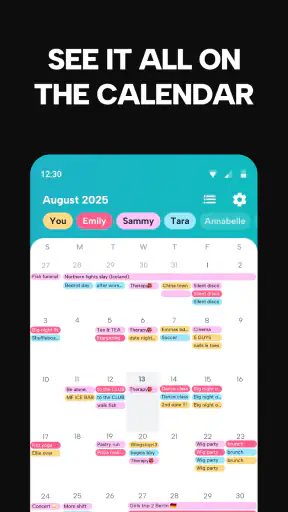
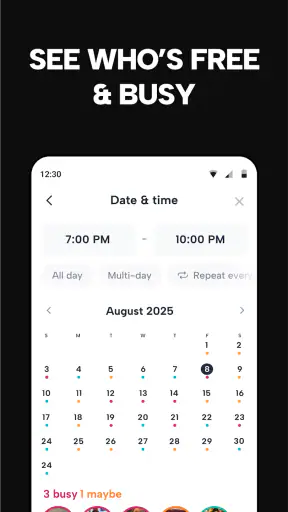
The most successful part of Howbout is the basic mental model. Instead of treating every appointment as a private calendar entry, it focuses on the question a group usually wants answered: who is available? That makes the app easier to approach than a traditional calendar when the goal is arranging a plan rather than managing a full personal schedule.
I also like that the shared view can reduce the need to interpret long text explanations. A message such as “I might be free after work, unless something changes” leaves room for confusion. A common availability view gives the group a more direct starting point. It does not eliminate the need to confirm details, but it can make the first step much clearer.
For someone who finds dense productivity apps tiring, this social framing may help. The app is not asking a new user to understand a complicated project-management system before making a plan. The useful path is relatively obvious: join or create a shared planning space, add availability, and look for an overlap.
That clarity is especially helpful for people who do not naturally think in calendar blocks. A friend who rarely opens a conventional calendar may still understand a shared view built around “who can make it?” In my testing, that difference was more important than having a long list of advanced scheduling controls.
There is a trade-off, though. A simple interface can hide the context behind an availability mark. If somebody says they are free, that does not necessarily mean they are ready for a late night, a long journey, or a noisy venue. I would use the shared calendar to identify possibilities, then discuss practical details in the group conversation.
Readable information depends on group habits
Howbout works best when everyone uses the same standard for marking time. If one person adds every small commitment and another only marks major events, the shared view becomes less dependable. I recommend agreeing at the beginning whether “free” means completely uncommitted or simply available enough to consider a plan.
This is one of the less obvious parts of using a social calendar: the app can display shared information, but the group still creates the quality of that information. A five-minute conversation about how to use it can prevent many later misunderstandings.
I would also avoid treating a blank space as a guaranteed invitation. A blank space may mean that somebody has not checked the app yet, not that they are definitely available. The safest workflow is to use open time as a shortlist, then ask for confirmation before booking anything that costs money or requires travel.
Motor and sensory considerations
From an interaction point of view, shared scheduling can be less demanding than repeatedly composing messages. A person who finds typing difficult, tiring, or slow may prefer updating a calendar state rather than explaining availability in several conversations. That is a practical benefit of the concept, even though it does not make every part of planning effortless.
The app still requires active participation. People need to open it, understand the calendar, select or update the relevant information, and respond when plans change. Anyone with limited dexterity may find repeated date selection or small controls frustrating, especially when making several updates in a row. I would test the current interface with the device’s own text, display, and touch settings rather than assuming every control will suit every user.
For users with visual sensitivities, a calendar can be easier to scan than a fast-moving chat, but it can also concentrate a lot of information into one screen. The practical advantage depends on spacing, contrast, text size, and how much the group has entered. A small, disciplined group is likely to be easier to interpret than a large one with many overlapping plans.
People with hearing-related access needs may appreciate that the core planning task is visual rather than dependent on a phone call. At the same time, Howbout should not be treated as a complete replacement for every communication method. The app can show shared availability, but the group may still need text-based discussion for location, transport, changes, or personal requirements.
Users who process information more comfortably when it is presented in a predictable order may benefit from establishing a routine: update personal availability first, inspect the group overlap second, and confirm the plan last. That sequence keeps the app from becoming another stream of ambiguous notifications or half-finished arrangements.
Situational access: where it earns its place
The clearest everyday use case for me is a group of friends trying to arrange dinner. Rather than asking six people to reply with separate lists of dates, I would create the shared plan, ask everyone to update their availability, and use the overlap to narrow the choice. Once a likely evening appears, the group can decide on the restaurant and travel details elsewhere or in the surrounding conversation.
It is also useful for families whose schedules change frequently. A parent, adult child, and grandparent may not share the same routine, yet they may all need to find a common window for a visit. A shared calendar gives them a visible reference instead of requiring one person to act as the permanent coordinator.
Couples can use it for a different reason. The value is not only finding a free date; it is making each person’s busy periods more visible before suggesting plans. That can reduce accidental pressure, particularly when one partner has irregular work, study, caring responsibilities, or recovery time that is not obvious from a normal conversation.
Howbout can also help groups that live in different places. When travel time matters, I would add the journey and practical limitations to the discussion rather than assuming a visual overlap is enough. The app can help locate a possible window, but it cannot make distant schedules equally convenient.
For users with fluctuating energy, health needs, or sensory limits, the shared calendar may support gentler planning. Marking a period as unavailable can communicate a boundary without requiring a detailed personal explanation. That is a meaningful social advantage: people can protect their time while still participating in group coordination.
However, I would be careful with sensitive information. A shared calendar is not the same as a private journal. If a person needs to limit what others know, they should share only the level of availability required for the plan. The app is most comfortable when the group already has a reasonable understanding of privacy and consent.
How it compares with ordinary calendars and chat
A standard calendar is usually better for private, detailed scheduling. It is the stronger choice when I need a complete record of appointments, reminders, recurring obligations, and personal notes. Howbout is more focused on the social question of coordinating people, so I would not replace a personal calendar with it if I rely on detailed individual planning.
Group chats are excellent for discussion but poor at preserving a clean view of availability. Messages disappear upward, people answer in different formats, and a late change can be missed. Howbout addresses that particular weakness by giving scheduling a dedicated place. The trade-off is that every participant must adopt the app and keep their information current.
Shared spreadsheets can be flexible, especially for a highly organized group, but they often feel like work. They require manual formatting and can be intimidating for people who simply want to say when they are free. Howbout offers a friendlier route for casual plans, although a spreadsheet may still win when a group needs custom categories, extensive notes, or a permanent administrative record.
Work-oriented scheduling tools are generally better for formal teams, deadlines, and structured responsibilities. I would not choose Howbout as the main system for managing a complex workplace rota unless the group’s needs are very light. Its social tone is its advantage for friends and family, but that same informality may be a limitation for professional accountability.
Remaining barriers and points of friction
The biggest barrier is participation. A shared calendar cannot solve a coordination problem if half the group refuses to update it. Introducing another app can feel like extra homework, particularly for relatives who already use messaging, a personal calendar, or paper notes. Before creating a large group, I would start with a small plan that produces an obvious benefit quickly.
There is also a maintenance cost. Availability changes, plans move, and people forget to revise old entries. If the group treats the calendar as permanently accurate, disappointment is likely. I found it more realistic to regard it as a current snapshot that needs occasional checking, not an automatic guarantee.
Some users may be uncomfortable making their schedule visible to others, even when the group is close. That concern is not a minor detail. A person should not feel obliged to expose more of their routine simply to remain included. The best approach is to agree on broad availability and keep personal explanations private unless they are relevant to the plan.
In-app purchases range from $3.99 to $39.99 per item, so although the app is free to start, some users may encounter paid options. I would explore the free experience first and decide whether any extra purchase solves a real problem for my group. A paid upgrade is difficult to justify if the people I coordinate with rarely open the app.
The current version is 16.2.0 and it runs on Android 8.0 or later. That makes device compatibility worth checking before inviting someone with an older phone. The age rating is Everyone, which fits its family-friendly scheduling purpose, but an Everyone rating should not be confused with suitability for sharing every kind of personal information.
Who should use it, and who should skip it
I would recommend Howbout to friends who repeatedly struggle to find a common evening, families coordinating visits, and couples who want a shared view of busy periods. It is particularly helpful when the problem is not a lack of communication but too many separate conversations that all contain partial answers.
I would also suggest it to people who find ordinary calendar applications too individual and group chats too messy. Its value sits between those tools: more structured than messages, but more relaxed and social than a workplace planner.
I would skip it if my group already has a reliable scheduling routine and nobody wants another app. I would also choose a conventional calendar when I need private detail, dependable reminders, or a complete record of appointments. For a large organization, a dedicated team scheduling system is likely to provide clearer roles and stronger administrative control.
People who need highly customized accessibility options should evaluate the live app carefully on their own devices. The shared-calendar concept can reduce typing and repeated explanations, but it does not automatically remove visual, motor, cognitive, or sensory barriers. I would involve the person who will use it most rather than deciding for them which interface is accessible.
My inclusive verdict
After using Howbout, I see it as a focused social tool rather than a universal calendar replacement. Its best contribution is making availability visible in a way that can reduce repetitive questions and give quieter members of a group a simpler way to set boundaries.
The most inclusive workflow is not simply inviting everyone; it is agreeing how much each person wants to share, how often availability should be updated, and how final confirmation will happen. That approach respects people who need flexibility, people who prefer minimal information, and people who may find fast group conversations difficult to follow.
Howbout is free to begin, has an Everyone rating, and comes from Howbout, with a strong 4.6 average and more than a million installs behind it. I would recommend trying it with one real plan rather than filling it with every future commitment. If the group finds that the shared view genuinely reduces effort, it can become a useful part of everyday planning. If it creates another place to maintain without improving communication, a normal calendar or a well-organized chat will be the better choice.
For me, the app succeeds when the question is “when can we all make it?” and the answer is currently scattered across several people’s lives. It is less convincing when the task requires detailed personal scheduling or formal control. Used within those limits, it offers a practical, relatively approachable way to make social planning clearer without asking one person to carry the entire coordination burden.


